
How to read .xlsx file:
Step 1: In order to read .xlsx file, you need to have the library com.crealytics:spark-excel_2.11:0.12.2 installed in the Databricks cluster.
Steps to install library com.crealytics:spark-excel_2.11:0.12.2 to Databircks cluster:
Step 1: Select the Databricks cluster where you want to install the library.
Step 2: Click on Libraries.
Step 3: Click on Install New.
Step 4: Select Maven.
Step 5: Put com.crealytics:spark-excel_2.11:0.12.2 in the text box under Coordinates and click Install.
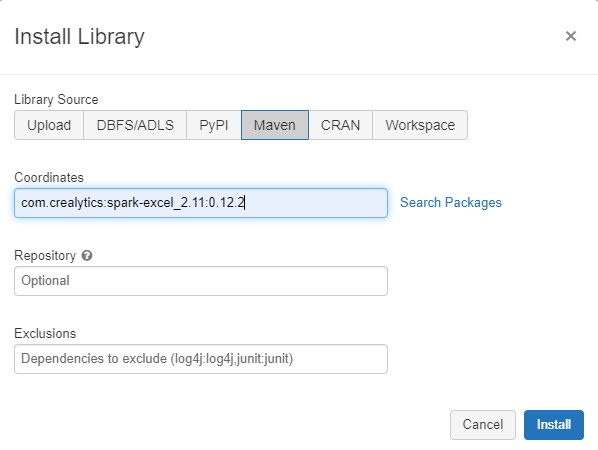
You will get Status as installed once the library is installed.

Step 2: Open the Databricks notebook.
Step 3: Write and run the code provided below to read the .xlsx file and store the values in Dataframe:
Dataframe = spark.read.format(“com.crealytics.spark.excel”)\
.option(“useHeader”, “true”)\
.option(“inferSchema”, “true”)\
.load(“/Location/FileName.xlsx”)

If you want, you can create a temporary view to store the Dataframe.
Ization.createOrReplaceTempView(“IzationSampelExcel”)

How to read .csv file:
Step 1: Open the Databricks notebook.
Step 2: Write and run the code provided below to read the .csv file and store the values in Dataframe:
file_location = “/Location/FileName.csv”
file_type = “csv”
infer_schema = “false”
first_row_is_header = “true”
delimiter = “,”
Dataframe = spark.read.format(file_type) \
.option(“inferSchema”, infer_schema) \
.option(“header”, first_row_is_header) \
.option(“sep”, delimiter) \
.load(file_location)

Thank you for reading and Happy Learning.
Ready to elevate your skills? Click here for my Python book and here for my Machine Learning book on Kindle.
 Ization
Տupeгb website you haѵe here but I was wanting to know
if you kneԝ of any message boards thаt cover the same topics talked aƅout here?
I’d reallү like to be a part of online community where I can get suggestions fгom other experienced
individuals that share the same interest. If you have any suɡgestions, please let
me know. Thanks!
LikeLike